Over the years, professionals like teachers, salespeople, and business executives have had to dedicate hours/days of tedious work to creating presentations.
Thankfully, the rise of excellent AI presentation makers has changed all of that. You can now create a polished, well-structured, and visually impressive slide within minutes. All you have to do is enter your prompt or document, and the AI will generate a complete, beautifully designed presentation in no time.
In this guide, we will review the 11 best AI presentation makers for 2026, highlighting their ideal use cases, compatibility, features, pros, and cons—so you can quickly find the perfect option for your workflow.
| Tool | Best Use | Standout Strength | Platform Support | Main Limitation |
|---|---|---|---|---|
| 1. Gamma | Educational storytelling | Flexible card-based presentation flow | Web | Limited animation precision |
| 2. AiPPT.com | Fast slide production | Converts notes, files, and webpages into slides | Web and App | Premium tools need subscription |
| 3. Pitch | Team presentations | Real-time collaboration and brand consistency | Web, iOS, Android | Limited traditional export formats |
| 4. Microsoft Copilot | Enterprise workflows | Deep Microsoft 365 integration | Windows, Mac, Web, Mobile | Free version is restricted |
| 5. STORYD | Data storytelling | Turns research into persuasive business narratives | Web | Less suited for minimalist decks |
| 6. Canva Magic Design | Visual presentations | Large creative asset library | Web, Windows, iOS, Android | Interface can feel overwhelming |
| 7. Sendsteps | Interactive teaching | Polls, quizzes, and audience engagement tools | Web | Limited advanced visualization |
| 8. Tome AI | Creative pitching | Narrative-focused multimedia pages | Web | No PowerPoint export |
| 9. Decktopus | Consultant presentations | Fast branded deck generation | Web | Fewer enterprise collaboration tools |
| 10. Prezi | Dynamic speaking presentations | Zoom-based non-linear presentation style | Web and Mobile Apps | Harder for traditional slide users |
| 11. Teamslide | Enterprise slide management | Centralized reusable slide libraries | PowerPoint add-in | No built-in AI presentation generation |
How We Tested These Tools
To evaluate the best AI presentation makers for 2026, we tested each platform using real presentation workflows instead of relying only on feature lists or product pages. The goal was to understand how these tools perform in practical situations where speed, editing flexibility, export quality, and collaboration matter.
We created multiple types of presentations during testing, including:
- Investor pitch decks
- Business reports
- Lesson plan presentations
- Marketing proposals
- Team meeting slides
- Webinar presentations
Each tool was reviewed based on several important factors:
| Evaluation Criteria | What We Checked |
|---|---|
| 1. Generation Quality | Slide structure, readability, and visual consistency |
| 2. Ease of Editing | Flexibility after AI generation |
| 3. Export Support | PPTX, PDF, image, and Google Slides compatibility |
| 4. Design Quality | Template variety and professional appearance |
| 5. Workflow Speed | Time required from prompt to final deck |
| 6. Collaboration Features | Sharing, commenting, and teamwork support |
| 7. Input Flexibility | Support for prompts, files, documents, and URLs |
| 8. Learning Curve | Accessibility for beginners and non-designers |
We also tested how much manual cleanup each tool required after generation. Some platforms produced nearly presentation-ready slides, while others still needed formatting adjustments before professional use.
1. Gamma
Gamma was one of the first AI presentation tools that actually felt different to me, rather than just being “PowerPoint with AI added on.” I used it recently to put together a presentation explaining AI workflows for a small workshop, and the experience felt much closer to building a visual story than designing individual slides.
I liked the card-based layout system. Instead of worrying about slide formatting every few minutes, I could focus more on the flow of information for educational or explanatory presentations, which makes a big difference. The presentations feel cleaner and less cluttered compared with traditional slide decks.
That said, Gamma is not perfect for every use case. When I wanted very specific layout adjustments or detailed animation control, I hit some limitations pretty quickly. Compared with PowerPoint or Canva, it offers less fine-tuned customization. So while it is excellent for quickly creating polished presentations, it may frustrate users who want complete design control.
Overall, I found Gamma especially useful for educators, startup teams, consultants, and creators who need to explain ideas clearly without spending hours designing slides from scratch.
🎯 Best for: Simplifying complex concepts into presentations
💻 Compatibility: Web-based

Key Features:
- Built-in analytics to track viewers’ engagement and performance metrics
- Multiple formats to export, such as PPT, PDF, PNG, and Google Slides
- AI-assisted edits like translations and layout suggestions
| Pros | Cons |
| ✅ Speeds prompt-to-presentation in minutes ✅ Great collaboration and sharing options ✅ You can embed YouTube videos, interactive charts, or links | ➖ No native Android/iOS app ➖ Less control over animations and pixel-perfect edits |
2. AiPPT.com
I tested AiPPT.com with several different types of content, including a meeting summary, a Word document, and even a webpage link, and the results were much more polished than I expected from an AI presentation tool. Instead of simply placing text onto slides, the platform organized the information into clear sections with layouts that actually looked presentation-ready.
What made the experience stand out for me was how adaptable the workflow felt. AiPPT.com offers different creation modes depending on the type of presentation you want to build. The standard presentation mode “AiPPT Classic” works well for business reports and classroom slides, while the more visual modes feel better suited for marketing content, storytelling, or creative projects. I also liked that I could continue refining the deck after generation without fighting against the editor.
Another thing I noticed during testing was the template variety. A lot of AI tools tend to generate presentations that all look similar after a while, but AiPPT.com has a large enough template library to avoid that problem. Exporting without watermarks was another major plus.
For students, educators, marketers, or business teams that need fast presentations from existing content, AiPPT.com feels practical, flexible, and easy to use, even for beginners.
🎯 Best for: Quick slide creation from any content
💻 Compatibility: Web-based & App

Key Features:
- Access to a huge library of over 200,000 PPT presentation templates
- Simple drag-and-drop editing tools
- Supports export as a PPTX file, PDF, or images
- Supports sharing via a link that allows for collaborative work
| Pros | Cons |
| ✅ Reduces creation time with AI automation ✅ Easy to navigate, even for beginners ✅ No watermark ✅ Simple-to-understand customization and data visualization enhancements | ➖ Premium features require a subscription |
3. Pitch
Compared with most AI presentation tools I tested, Pitch came across as far more team-oriented. I used it while putting together a client proposal with shared feedback from multiple people, and the collaboration experience was one of the smoothest parts of the platform. Instead of constantly sending updated files back and forth, everyone could review, edit, and comment inside the same workspace.
The interface also deserves credit. A lot of presentation tools try to offer endless customization options and end up feeling cluttered, but Pitch keeps things simple without looking limited. Editing text, swapping visuals, and adjusting layouts felt fast and intuitive, even when working on larger presentations.
One feature I found genuinely useful was the presentation tracking. After sharing the deck, Pitch let me see who viewed it, how long they spent on certain slides, and overall engagement activity. That makes it especially valuable for sales teams, agencies, and client-facing work where presentation performance actually matters.
The main downside I noticed was export flexibility. Pitch clearly prefers link-based sharing over traditional file downloads, so users who rely heavily on offline PowerPoint workflows may find that limiting.
🎯 Best for: Sales teams and agencies that require on-brand slide decks
💻 Compatibility: Web-based, iOS, and Android apps

Key Features:
- Pitch Room combines all your proposals and presentations in one place
- Slides status workflow for large teams to monitor progress
- 100+ customizable PowerPoint themes
| Pros | Cons |
| ✅ Supports 20+ languages ✅ Track slide views, time, and outreach performance ✅ Seamless integration of recorded videos | ➖ Export options focus on links instead of traditional file formats |
4. Microsoft Copilot
Microsoft Copilot felt the most familiar out of all the AI presentation tools I tested because everything happens directly inside PowerPoint. I used it to turn a long Word report into a presentation, and the workflow was surprisingly smooth. Instead of copying sections manually, Copilot pulled key points from the document, generated slides automatically, and even added speaker notes that were actually useful during review.
The biggest advantage is convenience for existing Microsoft 365 users. There is almost no learning curve if you already work inside PowerPoint, Word, Teams, or Outlook every day. I also found the live summarization feature inside Teams meetings helpful for quickly turning meeting discussions into presentation content without starting from scratch.
Another thing worth mentioning is offline access. Unlike many web-based AI presentation makers, Copilot still works inside the desktop PowerPoint app, which is useful for corporate environments where internet access is sometimes restricted.
The main limitation is pricing. Most of the stronger AI features are tied to Microsoft 365 subscriptions, and the free experience feels quite limited compared with dedicated AI presentation platforms.
🎯 Best for: Large organizations and Microsoft 365 users
💻 Compatibility: Windows, Mac, Web, iOS/Android apps

Key Features:
- Integrates seamlessly with other Microsoft 365 apps
- Generates detailed speaker notes for each slide, offering context to users
- Live summarization and Q&A of presentations inside Teams meetings
| Pros | Cons |
| ✅ No learning required for the people already using Microsoft Office ✅ No export or import hassles ✅ Works offline in the desktop app | ➖ The free tier is extremely limited |
5. STORYD
During testing, STORYD stood out more as a business communication tool than a traditional AI slide maker. I used it to turn a research-heavy market analysis into a presentation, and the platform did a good job organizing dense information into slides that were easier to follow. Instead of dumping large amounts of data onto the screen, it guided the content into a clearer narrative structure that felt more suitable for meetings and client discussions.
One thing I noticed quickly was how much the platform emphasizes messaging. STORYD does not just generate slides like a typical AI PowerPoint maker. It also suggests ways to frame ideas, highlight key takeaways, and improve the flow between sections. That makes it useful for consultants, analysts, and business teams that regularly present reports or strategy updates.
The workflow itself was fairly simple, and exporting to PowerPoint or PDF worked smoothly during testing. At the same time, the presentation style can feel a little structured if you prefer minimalist slides or highly creative layouts. It is clearly built for clarity and persuasion rather than design experimentation.
🎯 Best for: Turning data into clear, persuasive slides
💻 Compatibility: Web-based

Key Features:
- Idea generator to brainstorm message options
- Flexible AI suggestions and team tools
- Easy exporting to PPTX, PDF, or shareable online links
| Pros | Cons |
| ✅ Speedy tool for tight schedules ✅ Great for data-intensive work, such as pitch decks | ➖ No dedicated mobile app ➖ Story-driven approach may limit simplicity |
6. Canva’s Magic Design
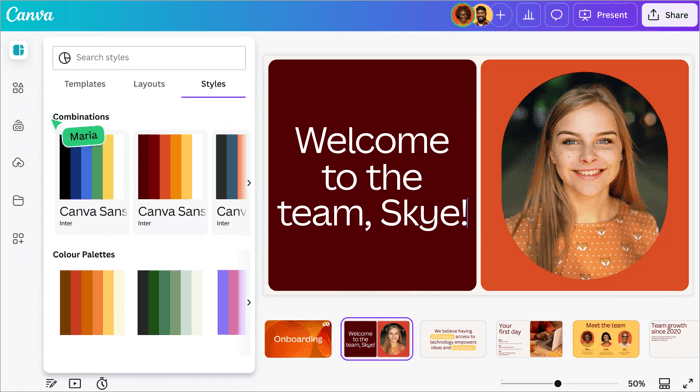
Canva’s Magic Design gave me much more creative flexibility than most AI slide generator platforms I tested. I used it to build a marketing presentation for a product launch, and the platform made it easy to combine AI-generated layouts with custom graphics, animations, and brand elements without needing advanced design skills.
What stood out most during testing was the visual library. Canva already has a huge collection of templates, icons, charts, and presentation graphics, so the AI tools feel more useful because you can continue refining the slides instead of starting over manually. The Magic Write feature was also helpful for rewriting headings and improving short sections of content inside the presentation.
The collaboration workflow felt smooth as well. Sharing editable links with teammates was simple, and the integrations with Google Drive, Google Classroom, and Microsoft Teams make it practical for both education and business use.
The only downside I noticed is that Canva includes so many tools and menus that beginners may need some time to get comfortable with the interface.
🎯 Best for: Beginners and small businesses
💻 Compatibility: Web-based, apps for iOS, Android, and Windows
Key Features:
- Access to various templates, graphics, animations, and charts
- Magic Write for AI-assisted text editing
- Collaborate via shareable and editable links
| Pros | Cons |
| ✅ Excellent for visuals and storytelling ✅ Robust safety features and mobile accessibility ✅ Integrates perfectly with Google Drive, Google Classroom, and Microsoft Teams | ➖ Steep learning curve with many functions |
7. Sendsteps
Unlike most AI PPT maker platforms that focus mainly on design, Sendsteps is built around audience interaction. I tested it during a workshop-style presentation, and the live polls and Q&A features made the session feel far more engaging than a normal slide deck. Participants could respond directly from their phones, which kept the presentation active instead of one-sided.
The setup process was also easier than I expected. After entering a topic, the platform generated a complete presentation with speaker notes, suggested questions, and interactive sections already included. For teachers or trainers who regularly need to create ppt using AI, this can save a lot of preparation time.
Another thing I appreciated was the language support. Sendsteps can generate presentations in dozens of languages, which makes it practical for international classrooms and training programs.
That said, the platform is much stronger for teaching and workshops than for highly visual business presentations. If your workflow depends heavily on advanced charts or polished corporate design, other AI slide maker tools may offer more flexibility.
🎯 Best for: Educators who need to make a lesson plan
💻 Compatibility: Web-based

Key Features
- Can generate full presentations from initial input
- Engagement analytics to track participation
- Integrations with PowerPoint and LMS tools
| Pros | Cons |
| ✅ User-friendly for non-designers ✅ Versatile for in-person/hybrid scenarios ✅ Can create presentations in up to 86 languages | ➖ No native app for iOS or Android ➖ Primarily education-oriented, less robust for heavy data visualization |
8. Tome AI
After testing Tome AI for a creative product pitch, it became clear that the platform cares much more about storytelling than traditional slide structure. The presentations feel closer to interactive visual pages than standard PowerPoint decks, which makes the experience very different from a typical AI slideshow maker.
The platform handled prompt-based generation very quickly. Within minutes, Tome created a clean presentation flow with large visuals, minimal text, and layouts that felt modern without requiring much manual editing. I also found the narration feature useful because users can record voice-overs directly inside the presentation, which works well for remote demos or async updates.
Another strong point is the overall simplicity of the interface. The collaboration tools felt smooth during testing, and importing content from Google Docs or Google Drive helped speed up the workflow for existing projects.
The main limitation is export support. Tome is clearly designed as a web-first presentation platform, so users looking to make a PPT using AI and continue editing in PowerPoint may find the PDF-only export restrictive.
🎯 Best for: Startup founders and creatives
💻 Compatibility: Web-based
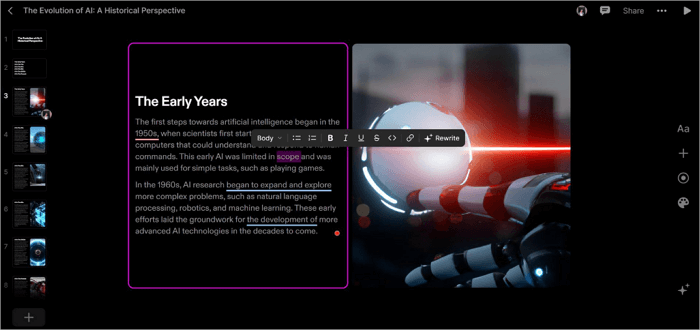
Key Features:
- Large-format visuals and minimalist design blocks
- Real-time collaboration for up to 5 users
- Supports imports of files from Google Docs or Drive
| Pros | Cons |
| ✅ Lightning-fast creation from prompts ✅ Users can record narration or add a voice-over to every page | ➖ Limited exports (PDF only, no PPTX/PowerPoint) |
9. Decktopus
Decktopus focused much more on speed and simplicity than heavy customization when I tested it. I uploaded a short consulting proposal, and the platform quickly turned it into a structured presentation with matching layouts, icons, and suggested content sections already in place. For users who need to create PPT online without spending time on formatting, the workflow feels very efficient.
The editing experience was straightforward enough for beginners, but the presentations still looked polished enough for business use. I also liked that the AI adjusted the presentation structure based on the amount of content provided instead of forcing everything into identical slide layouts. That helped the final deck feel more balanced and easier to present.
Another useful feature was the export flexibility. Moving the presentation into PowerPoint or Google Slides worked smoothly during testing, which made post-editing much easier compared with some web-first AI presentation platforms.
The main limitation is collaboration depth. Decktopus supports comments and shared editing, but larger organizations that need advanced team management tools may find the platform less suitable than enterprise-focused alternatives.
🎯 Best for: Sales reps and consultants
💻 Compatibility: Web-based

Key Features:
- One-click AI deck generation from topic, outline, or uploaded files
- 100+ PowerPoint presentation templates that adapt content length and style
- Supports AI-powered content suggestions
| Pros | Cons |
| ✅ Seamless export to PowerPoint and Google Slides ✅ Multi-user editing and comments | ➖ Not as robust for enterprise collaboration |
10. Prezi
Prezi is a trailblazing AI-enhanced presentation platform renowned for its non-linear, zoomable canvas that replaces rigid slides with dynamic, cinematic storytelling. Its designs captivate audiences in ways traditional tools can’t match, making it one of the best AI presentation software for the year.
What immediately stood out during testing was how different Prezi feels from a traditional AI PowerPoint maker. Instead of moving through static slides, the platform uses a zoomable canvas that allows presentations to flow between topics in a more dynamic and visual way. I tried it for a product strategy presentation, and the movement between sections made the content feel more engaging than a standard deck.
The AI tools also helped speed up the setup process. After entering a topic and uploading some reference content, Prezi generated a structured presentation with layouts that already matched its cinematic style. The customizable brand kits were useful as well because they made it easier to keep colors, fonts, and logos consistent across the presentation.
Another advantage is flexibility across devices. I tested both the desktop and web versions, and offline presenting worked smoothly without major issues. Integrations with Zoom and Microsoft Teams also make it practical for remote meetings and webinars.
At the same time, Prezi has a learning curve. Users familiar with normal slide-based workflows may need time to adjust to the non-linear navigation style. It is also less effective for presentations packed with dense charts or detailed reports.
🎯 Best for: Speakers who want non-linear presentations
💻 Compatibility: Web-based; app for Windows/Mac/iOS/Android

Key Features:
- Can generate complete presentations from prompts, uploads, or URLs
- Customizable templates and brand kits for colors, fonts, and logos
- Real-time collaboration and analytics for engagement
- Integrates with Zoom, Google Meet, YouTube, Microsoft Teams
| Pros | Cons |
| ✅ Zoomable canvas for clearer idea visualization ✅ Good for creating memorable presentations ✅ Offline editing/presenting | ➖ Not beginner-friendly for standard slide users ➖ Less suited for data-heavy reports |
11. Teamslide
What stood out immediately during testing was that Teamslide solves a very different problem from a typical AI PPT generator. Instead of creating new presentations with AI prompts, the platform helps large teams organize, search, and reuse existing PowerPoint content more efficiently. I tested it with a folder containing dozens of old company decks, and the slide search system made finding reusable charts, layouts, and branded slides much faster than manually sorting through files.
The integration with Microsoft PowerPoint was one of the strongest parts of the experience. Since everything works inside the PowerPoint interface, teams can access approved presentation assets without switching between multiple platforms. I also found the metadata and image search useful for locating specific content quickly across large presentation libraries.
For enterprises managing thousands of slides, this workflow can reduce duplicate work and keep branding more consistent across teams. Offline editing with automatic syncing also worked reliably during testing.
The main limitation is that Teamslide is not really an AI slide maker for generating presentations from scratch. Its focus is slide management, organization, and content reuse.
🎯 Best for: Large enterprises to manage thousands of slides
💻 Compatibility: Microsoft PowerPoint add-in

Key Features:
- Intelligent slide search with text, image, and metadata indexing
- Centralized library for storing, categorizing, and sharing slides
- Integrates with SharePoint, OneDrive, and Google Drive
| Pros | Cons |
| ✅ Saves time by removing duplicate slides ✅ Cost-effective for Microsoft-based organizations ✅ Supports offline editing with auto-sync | ➖ Focuses on slides management, lacks AI generation |
How to Make AI-Generated Slides Look More Professional
Even the best AI slide generators benefit from human editing. Small refinements can make presentations feel more polished and less template-driven.
Here are several ways to improve AI-generated presentations:
- Replace generic stock images with branded visuals
- Reduce unnecessary text on slides
- Simplify crowded layouts
- Add real company data or screenshots
- Adjust typography for better readability
- Keep colors consistent across the deck
- Rewrite robotic AI-generated sentences
These changes often make the difference between a presentation that feels automated and one that feels professionally designed.
Conclusion
The era of spending hours battling with templates, bullet points, misaligned images, and other jargon of PowerPoint presentations is over. Today’s best AI presentation makers don’t just automate slide creation; they rethink the entire process and deliver professional, engaging, & on-brand presentations in minutes.
Every option on this list is tested and trusted. The ultimate choice, however, depends on your needs. But if you need a superior presentation maker for an all-around purpose, AiPPT.com is the perfect option.
FAQs About the AI Tool for Presentation
Got questions about AI presentation tools? This FAQ section answers common queries on how they work, key features, and how they help students and professionals create polished slides quickly.
1. What is the best AI presentation maker for creating slides from web URLs?
AiPPT.com is a strong choice for turning web URLs into structured presentation slides. By simply adding a webpage link, users can transform online content into a complete deck with organized text, visuals, and layouts. The platform supports different creation styles through AiPPT Classic, AiPPT Flow, and AiPPT Visual, allowing users to choose between structured slides, flexible layouts, or more visual presentations. To create slides from a webpage, try the URL to PPT tool on AiPPT.com’s URL to PPT Tool.
2. What is the best AI PPT maker?
If you want quick, polished presentations without design skills, AiPPT is hard to beat. It transforms rough ideas, notes, documents, or webpages into clean, professional slides in minutes. With a huge template library and easy editing/export options, it fits students, educators, freelancers, or anyone needing fast, attractive PPTs, especially when time is tight.
3. How to use an AI presentation maker?
Using an AI presentation maker like AiPPT makes creating slides fast and easy, even without design skills. It can turn rough ideas, notes, or documents into polished presentations. To use AiPPT:
- Sign in to AiPPT on the web or app.
- Upload your content: notes, files, or URLs.
- Choose a template from the 200,000+ options.
- Edit slides with drag-and-drop and AI suggestions.
- Export or share as PPTX, PDF, or images.
4. What are the best AI presentation tools of 2026?
If you want to create slides quickly without design skills, AI presentation makers are a huge help. They turn text or rough ideas into polished decks in minutes. Some of the top tools today:
- AiPPT – Great for students or anyone needing fast, clean decks without technical work.
- SlidesAI – Instantly converts text or outlines into structured slides inside Google Slides.
- Beautiful.ai – Automatically handles layout and design, ideal for professional‑looking presentations without manual formatting.
- Gamma – Builds visually appealing slide decks quickly from minimal input, good for web‑style slides or creative storytelling.
- Prezi – Offers dynamic, non‑linear presentations, perfect for storytelling and engaging audience interest
- GlobalGPT – An all-in-one AI platform offering instant access to powerful models for writing, coding, and research.
5. Which AI presentation software offers a lifetime membership plan?
Several AI presentation tools offer lifetime plans, including AiPPT.com and some promotional offers from other providers. AiPPT.com is a strong choice because its lifetime option covers AI presentation creation, editing, templates, and export features in one workflow. Since pricing and credit limits can change, check the current plan details before purchasing.