If you’ve been creating presentations for a while, you’ve probably used an AI slide generator where you had to type in a prompt, wait for the deck to appear, and spend the next hour customizing it.
This process can be quite tiring, and that’s where the PPT agent comes in handy. These tools are moving beyond basic slide generation to help you plan, build, review, and revise presentations as part of one workflow.
This article will explain what an AI PowerPoint agent is and how it can help you turn your ideas into a more complete presentation.
Key Takeaways
- A PPT agent can understand a goal, plan a deck, create slides, and support revisions.
- Unlike a basic generator, it can work across several connected presentation tasks.
- It can turn prompts and source files into structured, presentation-ready content.
- AiPPT Agent combines planning, slide creation, and conversational editing in one workflow.
What is an AI PowerPoint Agent?
An AI PowerPoint agent is an AI tool designed to handle multiple tasks involved in creating a presentation. Instead of simply generating slides from one prompt, it can work through different stages of the presentation process.
The basic workflow is:
Understand → Plan → Create → Review → Revise
Unlike a standard AI presentation generator that simply creates slides from your instructions, an AI PPT agent can help with the connected tasks before and after slide generation. This may include organizing information, deciding what belongs on each slide, and responding to follow-up instructions.
How Does an AI PowerPoint Agent Work?
To understand how an AI presentation agent works, let’s walk you through what happens when you use the AiPPT Agent.
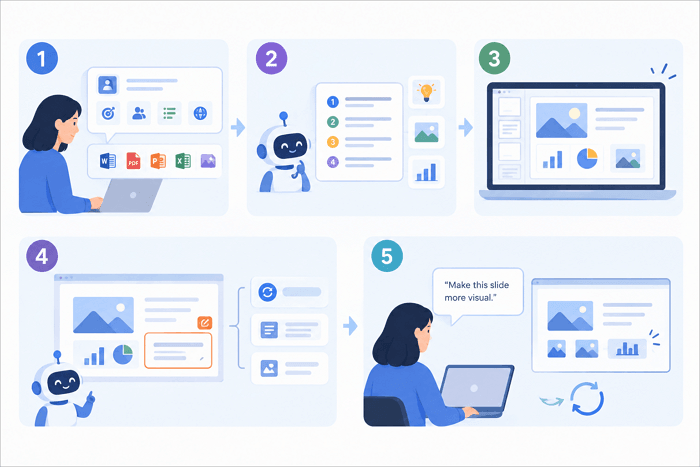
1. Understands the Goal and Source Material
The process starts with context. You can provide the topic, audience, purpose, preferred slide count, language, style, and other details.
AiPPT Agent can also work with existing source materials in various formats such as Word documents, PDFs, PowerPoint files, spreadsheets, and images. This means you do not always have to start with a blank prompt.
2. Plans the Presentation
The agent then works out how the information should be organized. Instead of simply placing paragraphs from your source material onto slides, it can determine the main ideas, slide order, content hierarchy, and visual direction. This planning stage helps turn raw information into a presentation with a clear flow.
3. Generates the Slides
After establishing the structure, AiPPT Agent turns the plan into actual slides. This can include written content, layouts, visuals, charts, diagrams, and other suitable formats.
4. Reviews and Revises
The first draft might not get everything right. One slide may contain too much information, while another may need a stronger visual. This is where the agent-based workflow becomes useful. You can regenerate weaker slides, adjust content, or make changes through the editor instead of rebuilding the entire presentation.
5. Responds to Follow-Up Instructions
You can also continue working with the presentation through natural-language instructions. For example, you could ask the agent to “shorten this slide,” “make this more visual,” or change the structure of a particular section.
It’s quite simple. Create a first draft, give feedback, and continue refining it until the deck is closer to what you need.
When is an AI PowerPoint Agent Useful?
An AI PPT agent can be useful whenever you want to turn information into a clear visual story. Some common use cases include:
✅ Business reports: Turn reports, spreadsheets, and scattered data into executive-ready slides.
✅ Pitch decks: Organize the problem, opportunity, evidence, and ask into a persuasive story that explains why your business is worth considering.
✅ Marketing proposals: Convert a brief containing campaign objectives, audience information, research, and recommendations into a structured proposal with supporting evidence, visuals, and expected results.
✅ Education: Break lessons or study materials into smaller sections and create a more natural progression from one concept to the next.
✅ Research presentations: Simplify dense sources into key findings, arguments, and supporting visuals.
✅ Project kickoffs: Organize goals, scope, milestones, responsibilities, and next steps so everyone on the team is on the same page.
Conclusion
In many presentations today, you’ll need the help of an AI PPT agent because it does more than just generate slides. It’ll plan your story, organize messy source material, and even improve your draft.
However, you should double-check key facts and figures in presentations generated with AI PowerPoint agents.
Do you currently have a real brief, report, or document you need to turn into a presentation? Try AiPPT Agent now and see how useful it can be.
FAQs on AI PPT Agent
These answers clarify what an AI agent for PowerPoint can do and what you should expect when working with source files.
1. How to use AiPPT Agent to make presentations?
Here’s how to generate a presentation with AiPPT Agent:
- Go to the AiPPT Agent page.
- Type in your topic or prompt.
- Alternatively, upload a file such as a Word document, PDF, or spreadsheet.
- Give the agent details about your audience, purpose, slide count, language, and style.
- Review the generated presentation.
- Then use natural-language instructions or the editor to make changes.
- You can regenerate individual slides before exporting the final deck.
2. How is an AI PowerPoint agent different from an AI presentation generator?
A basic AI presentation generator often focuses on producing a deck from a prompt. An AI PowerPoint agent, on the other hand, is designed to handle a broader workflow, including understanding source material, planning the structure, generating slides, and supporting revisions. The difference between the two is the level of task coordination.
3. Can an AI agent create a PowerPoint from a PDF or Word document?
Yes. AiPPT Agent, for example, supports Word documents and PDF files, along with PowerPoint presentations, Excel spreadsheets, CSV files, and images. It can extract key information from the materials you upload, organize it into a presentation structure, and build slides from that content.
However, you should still review important facts, figures, and claims before presenting them.