A successful newsletter should do more than just deliver updates. It needs a clear audience, a consistent purpose, and content people genuinely want to read.
This is why you should know how to create a newsletter, as it involves more than writing. You must plan your content, build a subscriber list, design the layout, test your work, and improve it over time.
This guide explains each step, from choosing your first topic to using AiPPT Agent to create newsletter content and visuals.
Key Takeaways:
- Define your audience and newsletter goals before writing.
- Use a repeatable structure and realistic publishing schedule.
- Focus on useful content rather than constant promotion.
- Build a permission-based subscriber list.
- Keep your design simple and mobile-friendly.
- Use AiPPT Agent or presentation templates to speed up creation.
What Should a Newsletter Include?
A newsletter needs a few core elements to help readers understand its message and take action. They include:
- Subject line: Gives readers a reason to open the newsletter.
- Opening: Introduces the issue and explains what readers can expect.
- Main content: Presents the most valuable story, update, or insight.
- Supporting content: Adds useful tips, news, links, or recommended resources.
- Visuals: Uses relevant images, graphics, or illustrations to support the message.
- Call to action (CTA): Encourages readers to take a specific next step.
- Footer: Provides contact details, preference options, and unsubscribe information where necessary.
Note that all these elements are crucial in every newsletter. A company update may focus on announcements, while an educational newsletter may be better suited to articles and practical tips. Choose a structure that suits your purpose and audience.
How to Create a Newsletter Step by Step
One thing to keep in mind when creating a newsletter is to follow the client’s decision-making journey. Here is a simple way to get started.
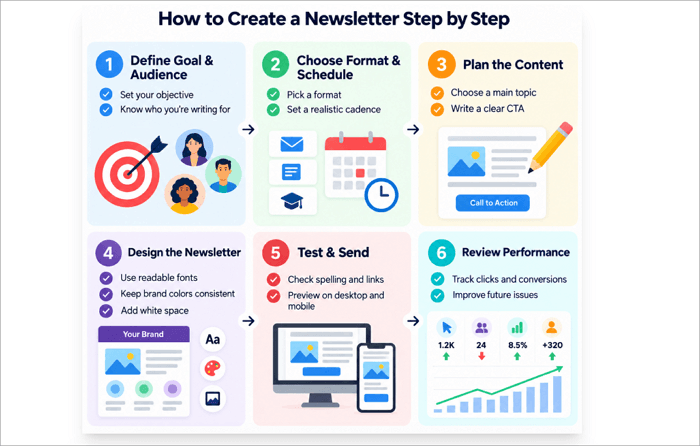
Step 1: Define Your Goal and Audience
Evaluate what you want to achieve with the newsletter and the kind of audience it should reach. Your goal might be to announce a new product, share industry insights, or bring traffic to your website. This step helps you choose relevant topics.
Step 2: Choose a Format and Schedule
Select a format that supports your goal. This could be a weekly roundup, monthly update, or educational newsletter. Then choose a publishing schedule you can maintain without compromising quality.
Step 3: Plan and Write the Content
Next, choose a main topic and organize other information to support it. Write a clear subject line, an engaging opening, concise body content, and a relevant CTA. Ensure that each issue focuses on a specific need of your audience.
Step 4: Design the Newsletter
Use readable fonts, consistent brand colors, sufficient white space, and relevant visuals. Arrange the content in a logical order so readers can scan it.
Step 5: Test and Send
Take some time to check spelling, links, images, and CTA buttons. It is advisable to preview the newsletter on both desktop and mobile devices. You can also send a test email to yourself before distributing the final version.
Step 6: Review Performance
Monitor clicks, unsubscribes, conversions, and subscriber growth. Use these results to identify what works and improve subsequent issues.
How to Plan Newsletter Content People Want to Read
Content planning is often harder than the technical process of making a newsletter. A simple system like this helps you create content that people want to read.
1. Start with the Reader’s Needs
What problems, questions, news, or information does your audience actually care about? For example, a newsletter for business owners could share marketing strategies and resources. Only give readers information that they need and can use.
2. Choose 2–4 Repeatable Content Types
Select a few recurring sections to make planning easier. These might include a main story, quick tips, industry news, curated links, product updates, customer stories, or recommended resources.
3. Balance Value and Promotion
Your newsletters may become less appealing when they try to sell something in every section. Mix useful, educational, or entertaining material with occasional product recommendations and offers. Ensure that there is a clear purpose behind every promotional message.
4. Create a Simple Content Calendar
Plan upcoming issues in a spreadsheet or calendar. Record four details for each one:
- Topic
- Audience need
- Main CTA
- Send date
This makes it easier to stay consistent and prepare content ahead of time.
How to Create a Newsletter Faster with AiPPT Agent
If you need a newsletter with a polished visual presentation, AiPPT Agent can help organize information and turn it into professionally designed slides. This is useful for visual newsletters, internal updates, and other types of newsletters.
Here is how to create a newsletter with AiPPT Agent:
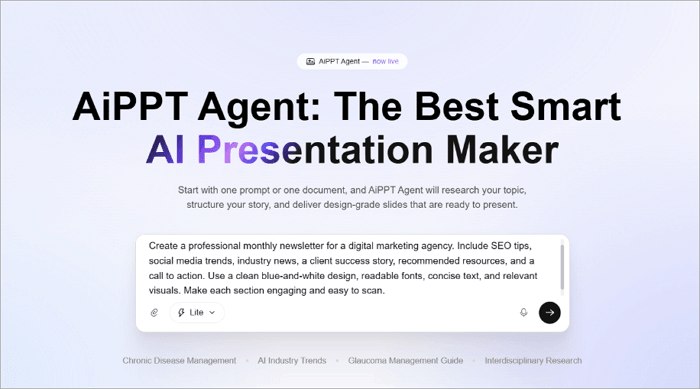
Step 1: Go to AiPPT Agent and describe the kind of newsletter you need or upload your source files.
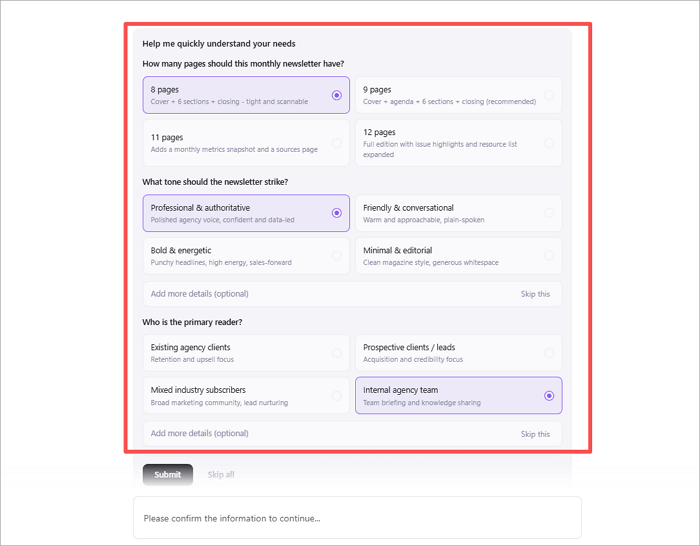
Step 2: Provide information about the audience, purpose, style, and content.
Step 3: Let AiPPT Agent organize the information, research when needed, and generate the visual content.
Step 4: Request changes through chat or adjust individual slides manually.
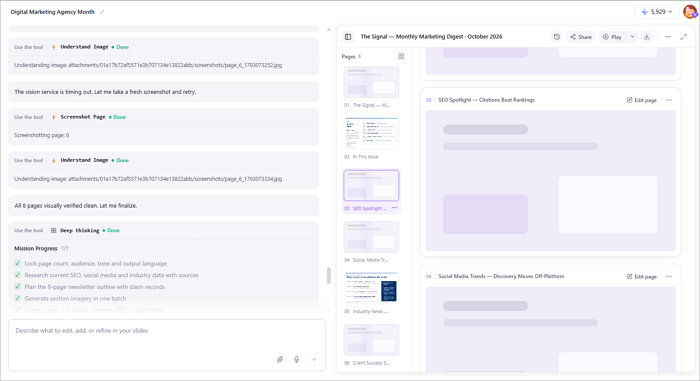
Step 5: Download the finished presentation in a supported format, such as PPTX, PDF, PNG, or HTML.
You can also explore AiPPT’s presentation templates if you already know the type of newsletter you want but need a ready-made design to customize.
AiPPT Agent creates presentation-style content, not a complete email distribution system. So for an email newsletter, you need to transfer or adapt the finished content into an email-marketing platform that manages subscribers, sends campaigns, and tracks results.
Newsletter Design, Sending, and Testing Best Practices
Use this checklist when creating or sending any newsletter:
- Keep the layout uncluttered and easy to scan.
- Use short paragraphs and descriptive headings.
- Design for mobile screens as well as desktop.
- Maintain consistent branding without using too many fonts or colors.
- Give each CTA a clear purpose.
- Compress large images to reduce loading time.
- Test every link and button.
- Send yourself a test email before distribution.
- Keep a consistent publishing schedule.
Track performance across several issues rather than judging success from a single one. Important metrics to track include clicks, unsubscribes, conversions, and subscriber growth.
Conclusion
As a creator or business owner, knowing how to create a newsletter helps you build lasting relationships with your audience. The process becomes even easier when you understand your readers, plan content, and use a repeatable design.
Remember that consistency and usefulness often matter more than creating an elaborate issue every time.
Start by outlining your first newsletter, selecting two or three content sections, and deciding when to publish. Alternatively, you can use AiPPT Agent or a suitable newsletter template to develop your first visual draft.
FAQs About Creating a Newsletter
Still have questions about creating a newsletter? These quick answers cover the most common ones beginners ask.
1. How do you create a newsletter for beginners?
To create a newsletter as a beginner:
- Choose an audience and a goal.
- Select a topic for the newsletter.
- Outline the main content.
- Add supporting sections and a CTA.
Also, choose a simple layout, proofread the content, and check the final design before sending.
2. How do I create an email newsletter?
Here is how to create an email newsletter:
- Research and choose an email marketing platform such as Zoho or Mailchimp.
- Create a permission-based subscriber list.
- Select a template and write your subject line and content.
- Then add relevant images and links.
- Test the email on different devices and send it to your subscribers.
- Review the results to improve your next campaign.
3. Can I create a newsletter with AI?
Yes, you can. AiPPT Agent, for example, can help you turn prompts or source documents into structured, presentation-style content that you can edit and export. However, you should review each output to ensure that it is accurate and consistent with your brand.