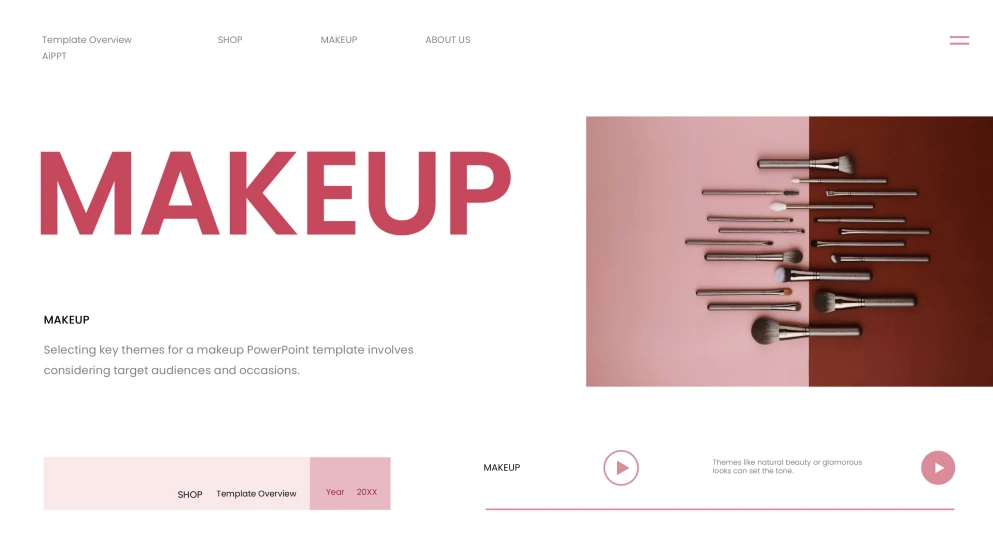
This Makeup PowerPoint Template leans into a soft, sophisticated aesthetic that feels incredibly fresh and professional. The color palette is dominated by warm pinks and clean whites, creating a calming backdrop that lets any product photography really pop. The layout relies on a clean, grid-based structure that maintains a perfect visual balance between open white space and decorative elements. You'll find stylish geometric frames, delicate line art, and layered shapes that add depth without feeling cluttered. The design also incorporates high-quality placeholder areas specifically shaped to showcase cosmetics, brushes, and swatches in a way that feels like a high-end fashion magazine. The typography is a chic mix of modern sans-serif for readability and elegant accents that give it a trendy, boutique vibe. It uses smooth transitions and subtle decorative dividers to guide the eye naturally from one section to the next. It's an ideal choice for anyone wanting a minimalist yet luxurious look that feels both contemporary and timeless. Whether it's for a brand pitch or a creative portfolio, the artistic flair and polished finish make it a standout choice for a visual-heavy presentation.
How to Use Our Other Templates to Create a Polished Presentation
Choose an Other Template that matches your story (timeline, process, SWOT, checklist, diagram). Download and open it in PowerPoint or Google Slides, swap in your text and images, and keep key elements aligned by using the built-in grids and master slides. Finish by updating icons, adding speaker notes, then export to PPTX or PDF for sharing.
Creative Hacks for This Makeup PowerPoint Template
This stylish layout of this beauty PPT template showcases a sophisticated neutral palette paired with an elegant, grid-based structure that highlights visual balance. Its minimalist frames and chic decorative accents provide a high-end editorial feel, perfect for showcasing creative cosmetic portfolios. Here are some practical tips, such as prioritizing high-resolution photography and utilizing the ample white space, to make your presentation slides more polished.
Select a Cohesive Theme
Determine if your presentation focuses on natural beauty or high-glamour looks to set a consistent tone across all slides.
Balance Visual Elements
Distribute images and text evenly on each slide to ensure the layout remains clean and doesn't overwhelm the audience.
Source High-Quality Imagery
Utilize free high-quality image sites like Unsplash or Pexels to find professional photos that match the boutique aesthetic.
Incorporate Brand Logos
Place your specific brand logo strategically in the header or corner of slides to build recognition and a professional feel.
Use Subtle Animations
Tailor your transition effects to be smooth and subtle, helping to highlight key points without distracting from the content.
Showcase Step-by-Step Tutorials
Utilize the structured layout to visually demonstrate makeup processes, making it ideal for educational or training sessions.
Frequently Asked Questions
Can I change the background colors of the slides?
Is it possible to add my own brand logo to the slides?
Can I use this for a step-by-step tutorial?
Is the template compatible with software other than PowerPoint?
Try the Free Pink Aesthetic Makeup PowerPoint Template