For leaders, consultants & teams

Executive Summary Slide Examples to Clarify Your Recommendation

Create a leadership-ready executive summary slide in minutes. Start from a proven business structure, then customize the core message, evidence, recommendation, performance metrics, and next decision.Create an executive summary slide in minutes. Customize findings, metrics, recommendations, and next steps with AI.

Browse Templates
Board updatesConsulting readoutsBusiness reviews
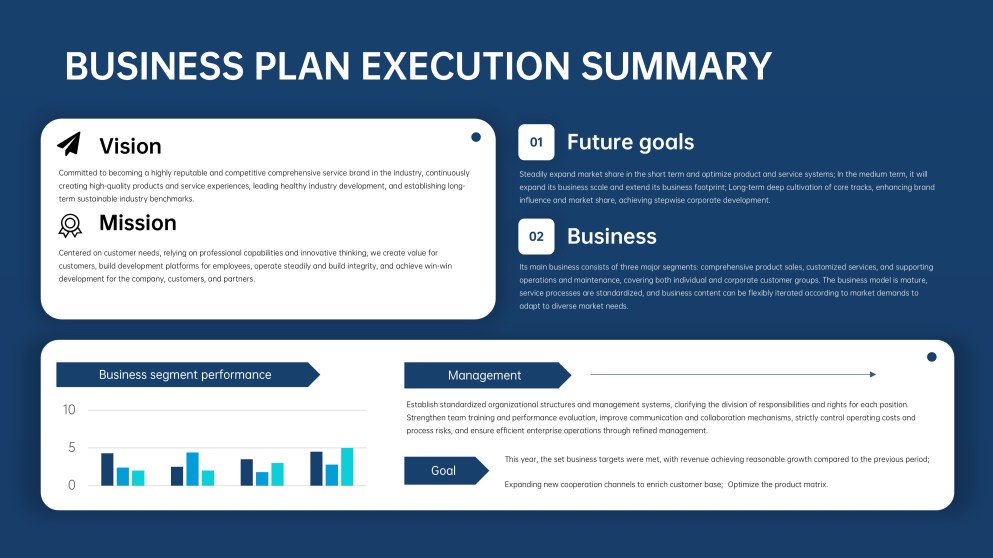
Business Plan Executive Summary PPT
Executive-ready message flow
AI-assisted summary copy
Editable business templates
Export to PowerPoint

Related executive presentation resources

How to create an executive summary slide

  1. Define the executive audience and the decision they need to make.
  2. Distill the deck into one conclusion, three findings, and supporting metrics.
  3. Generate an initial executive summary format with AI or a template.
  4. Replace topic labels with action titles, evidence, owners, and deadlines.
  5. Check every claim against the deck, then review and export.

Example sections in your executive summary slide

  • Decision-ready headline and context
  • Three evidence-backed key findings
  • Recommended action and expected impact
  • Critical performance metrics
  • Owners, timing, and next decision

Choose your executive summary slide format

Board Meeting Executive Summary PowerPoint

Applicable to:

Board meetingsLeadership reviewsGovernance updates

Summarize performance, risks, strategic choices, and approvals required from directors in a concise board-ready format.

Consulting Executive Summary Slide

Applicable to:

Client readoutsStrategy projectsSteering committees

Lead with the answer, support it with synthesized findings, and close with a practical recommendation.

Quarterly Business Review Executive Summary

Applicable to:

Sales QBRsOperations reviewsDepartment updates

Condense quarterly results, notable variances, lessons, priorities, and accountable next steps for senior leaders.

Project Executive Summary Presentation

Applicable to:

Project sponsorsProgram reviewsClient handoffs

Present project status, delivered outcomes, current risks, decisions required, and the immediate action plan.

Example executive summary PowerPoint

What makes an executive summary slide effective

  • The headline states the conclusion or decision, not merely the topic.
  • Every finding is supported by a meaningful metric or observable fact.
  • The recommendation names the action, owner, timing, and expected impact.
  • The slide can be understood independently from the full presentation.

Common mistakes

  • Shrinking several detail slides into unreadable text on one page.
  • Listing facts without explaining their implication for leaders.
  • Introducing claims that are not supported elsewhere in the deck.
  • Ending without a clear recommendation, decision, or next step.

Frequently Asked Questions

An executive summary slide is a one-page synthesis of a presentation's central message, most important evidence, recommendation, and next action. It should let a busy decision-maker understand the conclusion without reviewing every detail slide first.
Include a takeaway headline, essential context, two to four key findings, supporting metrics, the recommended action, and any decision required. Add owners or timing when execution responsibility matters.
Use an answer-first format: conclusion at the top, grouped evidence in the middle, and recommendation or next step at the bottom. A consulting-style situation, complication, and resolution structure also works when the story depends on a clear chain of reasoning.
For a full business deck, the executive summary is commonly one slide. If the summary must stand alone as a short presentation, use only the few slides necessary to cover context, findings, recommendation, and next steps without repeating the source deck.
Write the summary after the detailed analysis is stable, then extract the message from each major section. Combine those messages into a logical storyline, keep only decision-relevant evidence, and use a template to create clear visual hierarchy.
AI can help condense source content into a draft headline, findings, and recommended structure. With AiPPT, you can generate a presentation from a prompt or content, choose a business template, and then verify every number and conclusion before presenting.
AI Presentation Maker

Generate your executive summary slide now

Turn your business context, evidence, and recommendation into a clear executive summary presentation with AI.