Have you ever wondered why you have not been hired, even after attending so many interviews? In many cases, applicants get denied because of how they handled the interview presentation stage, and not because of their experience or qualifications.
Employers today are interested in how you think, structure your ideas, and how professional you can be. The interview presentation shows them that.
In this guide, we’ll explore practical interview presentation examples, step-by-step building instructions, design tips, and takeaways you can use right away.
What is an Interview Presentation?
It is a structured slide deck or spoken pitch that candidates are asked to deliver during job interviews. These presentations are often created using Microsoft PowerPoint or Google Slides.
Employers hiring for roles in management, consulting, tech, sales, and marketing request this presentation to evaluate you beyond your resumé, and see how you think, communicate, and solve problems in real time.
Let’s see how to make the most of these points:
✅ Clarity: Explain your ideas — no matter how complex in a simple way.
✅ Logical structure: Does your content flow logically, including a beginning, middle, and end?
✅ Problem-solving ability: Be able to analyze situations and propose solutions.
✅ Communication skills: Can you hold the room, speak confidently, and handle questions?
5 Popular Interview Presentation Examples
There are many job interview presentation samples employers can choose from and ask you to present on. Here is a breakdown of the five most common formats and what each one should include.
1. Case Study Presentations
This format is quite common in consulting, strategy, and analyst roles and is primarily used to test analytical thinking. The interviewer gives you a business problem, then asks you to analyze it, provide insights, and propose solutions.
Example scenario:
You are hired as a business analyst. Sales dropped by 15% in the last quarter. What would you do?
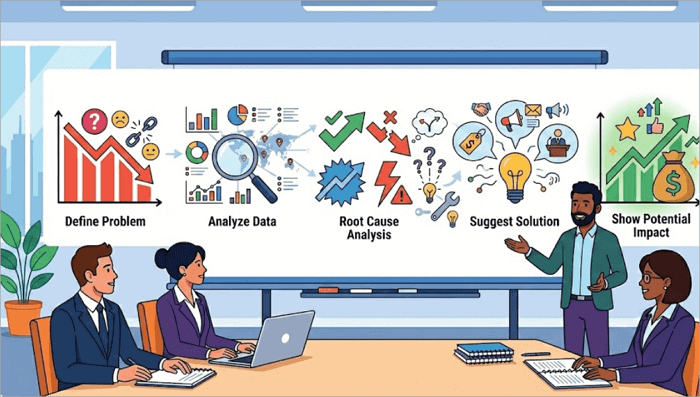
Here’s how you can organize your presentation:
- Define the business problem, which is a 15% decline in sales.
- Analyze the sales data you have at hand by region, product line, or customer segment.
- Go into the root cause analysis using frameworks such as SWOT or 5 Whys.
- Suggest a solution (Price review, digital campaign, sales training).
- Show the potential impact of your proposal on sales using visuals.
2. Strategy or Proposal Presentations
Interview presentations such as these are used to evaluate strategic thinking. You are more likely to encounter them when applying for roles in management, marketing, or consulting.
Example scenario:
You are asked to present a 6-month digital marketing strategy for launching a new product.
You can structure your presentation for an interview like this:
- Clearly define the campaign objectives and expected outcome.
- Who is your target audience, and what is the market opportunity? Identify them.
- Outline the marketing strategy for different platforms (SEO, paid ads, influencer partnerships).
- Present an implementation timeline and budget breakdown.
- Show measurable KPIs such as traffic growth, leads, and ROI.
3. Project or Portfolio Showcase
There are certain instances where an interviewer would ask you to walk them through your portfolio or past projects. Many of these are common in interviews for tech, design, and other creative roles.
Example scenario:
Present a project you led involving a feature launch for a mobile app that improved the startup’s performance.
Your presentation can follow this pattern:
- Introduce the project background.
- Describe your specific role in the project and the challenges you encountered.
- Show the actions you took to solve those challenges.
- Present measurable results such as increased revenue or improved KPIs.

4. Role-Specific Task Presentations
In this type of job interview presentation example, interviewers tend to go deeper. The presentations are tailored to the specific role you are applying for and test how you would perform in the role.
The interviewer assigns a task that mirrors something you would do in the role, then evaluates how you approach and deliver it.
Example scenario:
Deliver a 10-minute pitch to sell company software to a mid-sized business (Sales role).
Here’s how to plan your pitch:
- Identify the client’s key pain points, such as “Your logistics team loses an average of 11 hours per week to manual status updates”.
- Introduce the company’s software and describe its main features that address those pain points.
- Compare it briefly with competitors or show testimonials from past clients.
- Close with a clear and confident next step, such as proposing a 30-minute demo with the operations team.
5. Problem-Solving Presentations
This format is often used across operations, product, and general management roles, and it evaluates how you think under pressure and sometimes, with limited information.
Example scenario:
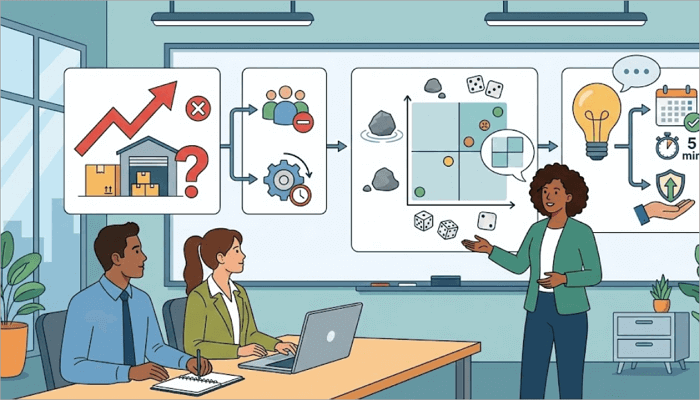
You are interviewing for an operations manager role. Warehouse dispatch times increased by 40% last month. Identify the likely causes and propose a fix.
Check out this structure when preparing your presentation:
- Describe the problem statement, which, in this case, is the rise in dispatch times.
- List your hypothesis for the possible cause, such as staffing shortage or a software lag.
- Use a simple prioritization framework, such as a two-by-two matrix rating each cause by likelihood and impact, to show structured thinking.
- What do you recommend? It can be a review of shift scheduling against order volume peaks.
How to Build Your Job Interview Presentation
Now that we’ve explored the most common presentation examples for interviews, let’s walk you through how to create one for yourself.
Step 1: Define Your Objective
Write down what you want your presentation to achieve. You should also know who the audience is: a single interviewer, a panel, or a technical team?
In addition, what is the most important thing you want them to remember from your presentation?
Step 2: Outline Your Content
Nothing beats a good structure in any presentation. A good framework for your interview slide deck should include:
- An introduction
- The business problem
- Analysis
- Recommendation or solution
- Conclusion
Step 3: Add Data and Visuals to Complement
Statistical data is good and even better when you represent it using visuals such as charts, diagrams, or icons. It helps your recruiter understand you better.
Step 4: Build Your Slides
Choose your most preferred presentation tool (AiPPT.com, PowerPoint, or Google Slides) and start creating.
Step 5: Practice
Creating a presentation for your job interview is only one part; you still have to present it. So, practice your delivery out loud at least twice, and remember to time yourself.
Design a Professional Interview PowerPoint Presentation
When it comes to interview presentations, you’ll find that clean and readable slides can take you really far. Your PPT presentation should follow a few core principles:
- Minimal text
- Consistent fonts and colours
- Clear section titles
- Balanced white space.
But it can be difficult to stick to these principles while creating slides from scratch. That’s where AiPPT.com’s template library comes in — to help you make polished slides quickly and improve your overall presentation.
In the AiPPT.com library, you will find templates for various kinds of interview presentations across marketing, sales, tech, business, proposal, and education.
Example Template from AiPPT.com: Dynamic Marketing Strategy PowerPoint Template

From its name, you can tell that this template is ideal for marketing interview presentations. It has a vibrant yellow design and features slides for market analysis, target audience definition, channel strategy, budget allocation, and data charts.
Tips Inspired by Job Interview Presentation Examples
Before going ahead to deliver your slides, review these practical tips we’ve drawn from real job presentation examples:
| Tip | Why It Matters | How to Apply |
| Visualize key points | Keeps slides readable | Use charts or icons instead of text-heavy slides |
| Anticipate questions | Shows preparedness | Prepare concise answers |
| Focus on outcomes | Demonstrates value | Highlight measurable impact |
| Keep slides simple | Improves clarity | Limit each slide to one idea |
| Use a consistent visual theme | Shows credibility and professionalism | Stick to one font family and two to three colors throughout |
| Practice delivery | Builds confidence | Rehearse with a timer (interviews last 10 -15 minutes) |
Conclusion
In real hiring scenarios, an interview presentation reveals how you think under pressure. You may have prepared your slides beforehand, but your presentation will show if you are fit for the role.
Practicing with real interview presentation examples, such as the ones in this article, builds confidence and clarity during your interviews.
Go ahead and build a mock presentation using one of AiPPT.com’s professional templates, time your delivery against a realistic limit, and refine from there.
Learn More About Presentation for an Interview
Let’s check out answers to questions candidates often ask about preparing for an interview presentation.
1. How to use job presentation examples for preparation?
Adapting any of the examples mentioned in this post for your interview presentation is quite easy. Here’s how to go about it:
- Identify the structure used in the example.
- Analyze the slide flow and transitions.
- Adapt the format to your own topic.
- Replace the details with your experience and context.
- Practice the delivery.
2. Can you give a job interview presentation example?
Here’s a simple job interview presentation example for a data analyst role:
- Introduce your background and the business context.
- Define the core business problem.
- Explain your data analysis approach.
- Present key insights using charts and other visualization options.
- Provide recommendations.
3. How long should an interview PowerPoint presentation be?
Most interview PowerPoint presentation sessions last 10–15 minutes, and in rare cases, 20 minutes. So, aim for 8-12 slides in your presentation unless specified otherwise.