As AI-driven presentation tools have become increasingly common, the way people create slides has undergone significant changes. Professionals, filmmakers, students, and teachers now rely on these tools to create engaging presentations more quickly and with less effort. Users get to save time while removing the technical barrier traditionally involved in slide creation.
Gamma AI has attracted strong interest among the best AI presentation makers for its ease of use and ability to produce clean, professional-looking slides in a short time. This article offers a hands-on review of Gamma AI Presentation, explaining what it is, how it works, its core features, key advantages and limitations, and a closer look at a highly efficient alternative worth considering.
What is Gamma AI Presentation
The Gamma AI Presentation is simply a tool powered by artificial intelligence to build professional-grade slides. It’s designed to turn raw ideas into structured, visually attractive slides without requiring extensive design expertise.
Gamma AI PPT maker can be used by a diverse audience to solve different problems, such as teachers developing lesson plans, filmmakers creating movie pitch decks, consultants preparing client reports, or founders pitching startups. This tool provides a full presentation, allowing users to focus on editing instead of starting from a blank page.
How the Gamma AI PPT Maker Works
The Gamma presentation AI operates through a simple 5-stage process. But before that, you need to log into your Gamma account or sign up (if you don’t have an account yet).
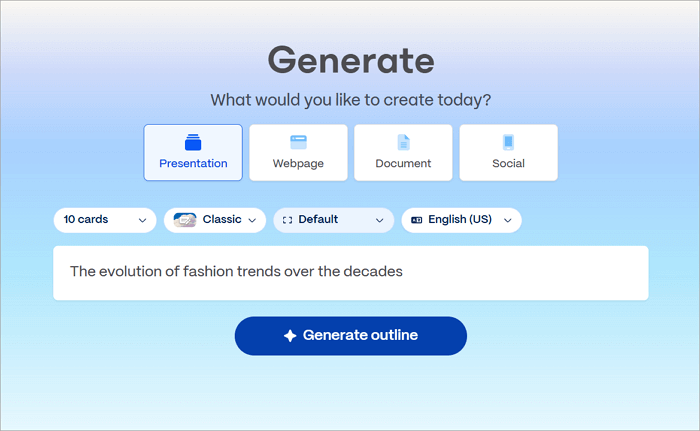
Step 1: Choose how to enter your idea or topic, whether through a one-line prompt, pasted text, URL, imported file, or structured template.
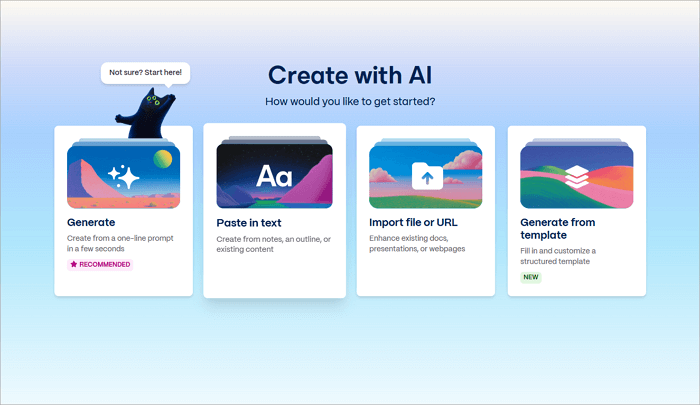
Step 2: Enter the idea or topic, and click on Generate Outline.
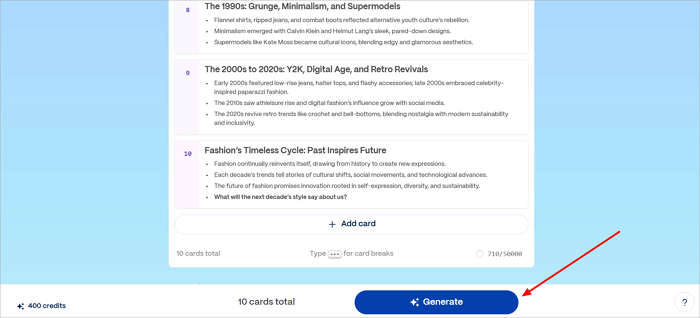
Step 3: Review the outline and edit it to your satisfaction. You can change card headings, merge cards, delete unwanted cards, and choose a theme for the presentation. Click Generate.
In Gamma, slides are called “cards.”
Step 4: Gamma generates cards with structured content according to your instructions. Afterwards, you can collaborate with colleagues, share the link, export the presentation, or embed it in a website.

Key Features of Gamma Presentation AI
The Gamma AI presentation offers several features to enhance efficiency and creativity in slide creation. Below is a table outlining its most important and representative features.
| Features | What It Does |
| AI Content Generation | Enter a short prompt, paste text, import a file/URL, or fill in a structured template. Gamma turns that input into a working presentation, which you can then adjust. |
| Image and Media Integration | Cards don’t come out empty. Gamma automatically adds images, icons, charts, and other visuals, so the deck looks complete without extra design work. |
| Custom Branding Options | Colors, fonts, and logos can be customized to match a brand or company’s style. This makes the presentations look consistent and professional. |
| Real-Time Collaboration | More than one person can work on the same deck at the same time. Changes appear instantly, which helps when working with teammates or reviewing content together. |
| Engagement Analytics | Shows you how viewers interact with shared links: who opened it, how long they spent on each slide, and where they dropped off. |
Gamma AI Reviews: Pros and Cons
As many Gamma AI reviews sing praise of its benefits, there are a couple of drawbacks that affect its efficiency. Highlighted below is a list of what users find most valuable and what limitations they complain of.
Pros
- Comes with a generous free plan.
- Very quick to create a full presentation just from a raw idea.
- Clean, easy-to-understand interface for beginners.
- Supports the use of interactive elements like polls, GIFs, etc.
Cons
- The outputs sometimes are not in-depth, which can be a problem for high-stakes professional use.
- Does not follow full instructions in larger or complex decks.
- Exports (especially to PowerPoint/Google Slides) often break formatting, requiring extra editing.
Gamma AI Pricing Overview
Gamma presentation AI offers three pricing plans to accommodate different users, starting with a free plan for basic functions.
Free Plan
- Costs nothing
- comes with 400 AI credits
- Enough to generate simple slides and text
- Exports are allowed
- Every exported deck has a “Made with Gamma” watermark
- Works if you’re just checking the tool out or using it once in a while
Plus Plan
- $10 monthly, or $8 if billed yearly
- Watermark is removed
- No real limits on AI usage
- You can roll back to older versions of a presentation
- More themes and branding controls compared to free
- Probably the most practical option for solo users
Pro plan
- $20 per month, or $15 on annual billing
- Everything in Plus is included
- Support replies are faster
- More control over AI editing
- Image generation looks better
- API access is available
- Team workspaces are included
- Clearly aimed at business or heavier usage
Gamma AI Alternative Explained: AiPPT.com vs. Gamma
While Gamma AI is great for fast presentation creation, some users seek other sites like the Gamma app to serve as alternatives in scenarios where more in-depth results are needed. After thorough evaluation of many options, AiPPT emerges as the perfect Gamma AI alternative.
Below is a table that compares both of them, highlighting their differences. There is also a guide to show when Gamma is the better choice and when AiPPT.com is more suitable.
1. Gamma AI vs AiPPT.com: Key Differences at a Glance
| Key Difference | AiPPT.com | Gamma AI |
| Design | Over 200,000 templates for slides across several industries and drag-and-drop tools for detailed customization. | Modern themes with AI auto-layouts. No option to choose a preferred industry-specific template. |
| Analytics Tracking | No native built-in analytics or viewer tracking for shared presentations. | Built-in engagement analytics (available on Pro plan) for shared links. |
| Export Options | PPTX, PDF, images, and links. Formatting and structure often stay intact across all exports. | PPTX, PDF, PNG, Google Slides, and links. Experiences some formatting quirks in PPTX and Google Slides exports. |
| Pricing Plans | Free $0Plus $5 per monthPro $7 per month | Free $0Plus $10 per monthPro $20 per month |
2. When to Choose Gamma AI and When to Use AiPPT.com
Rather than comparing features at face value, the real decision between Gamma AI and AiPPT.com comes down to usage scenarios. Read on to see which platform aligns better with your workflow, content depth, and presentation goals.
Use AiPPT.com:
- When handling heavy-data or report-intensive projects, like financial reviews or market analysis, that require precise charts.
- When you need to make interactive Google Slides that can be exported as a PPTX file without losing format.
- You need an AI presentation maker with vast template options for different industries.
- You need a more affordable yet efficient AI presentation tool.
Choose Gamma AI:
- When speed is paramount, such as creating a full pitch deck for last-minute investor meetings or internal brainstorming sessions.
- When you want to publish presentations as interactive web pages with built-in engagement analytics to track audiences.
- For collaborative remote teams that benefit from real-time editing and comments.
- For users who prefer a clean, card-based, nonlinear format to tell stories and showcase product demos.
Conclusion
Gamma AI Presentation is no doubt one of the top AI PPT makers, but it has its flaws. This article has reviewed Gamma AI, examining how it works, its features, pros, cons, pricing overview, and even comparing it to AiPPT.com (a worthy alternative). Both Gamma and AiPPT.com are fantastic, but they have their areas of specialization. Thus, it’s recommended that you choose your preferred option based on your specific needs.
Gamma is great for creating a visually attractive presentation within minutes, while AiPPT.com offers a more comprehensive solution for generating an award-winning deck regardless of how complex the topic is.