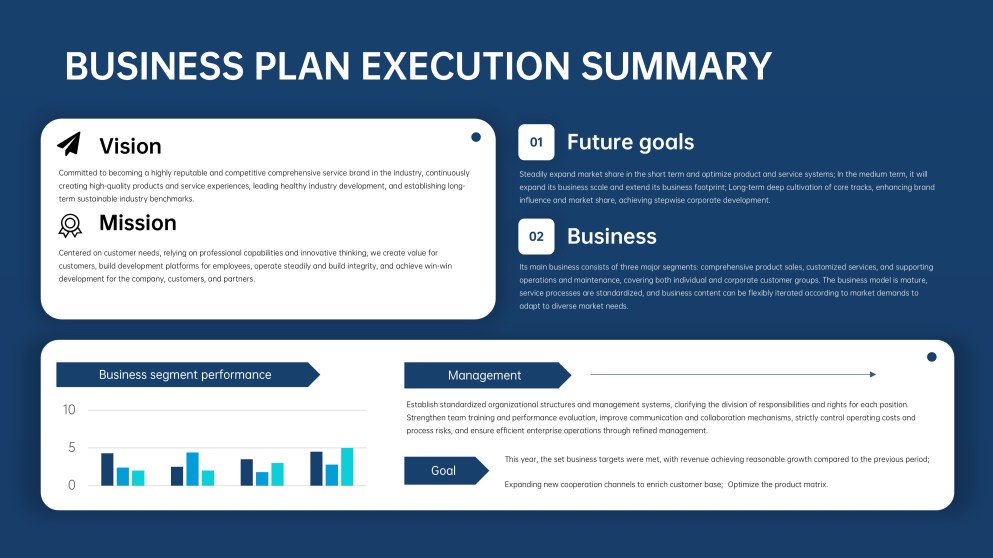
An executive summary slide is a single, impactful slide that contains the major points of your presentation. It’s specially made for busy decision makers who don’t have the luxury of time to go through the whole presentation. A well-crafted executive summary sets the tone for the presentation and highlights key insights for informed decision-making.
In this article, you will learn what an executive summary looks like, its key components, and you will get access to free examples & templates to use.
What Does an Executive Summary Look Like?
Regardless of the type of executive summary format, the slide must be concise, well-organized, and informative. A sales pitch may highlight the customers’ problem, the proposed solution, and the unique benefits. For a business report, it may spotlight performance metrics and strategic outcomes, while a film pitch deck emphasizes the story concept, target audience, creative vision, and commercial potential.
When an executive summary PPT format is done well, the texts are balanced with the visuals, ensuring that they enhance clarity rather than confuse.
Key Components of an Executive Summary Slide
An executive summary slide can be the difference between getting a nod for your presentation and a rejection. It should be broken down into clear, purposeful sections to help decision makers easily grasp what matters and what action needs to be taken.
They include:
1. Objective / Purpose
Every executive summary starts by clearly stating the reason for the presentation. A well-written objective should be brief, clear, and focused on ensuring that decision-makers understand what they are asked to consider. No beating around the bush—just go straight to the point.
Example: “Intention to secure approval to launch a new customer onboarding platform in Q3.”
2. Situation / Background
Give more clarity to make the audience better understand the situation on the ground. This section briefly outlines the factors that led to the creation of the presentation, including the current state of affairs and relevant historical context.
Example: “Customer acquisition has increased 30%, but the onboarding process remains largely manual and inconsistent.”
3. Complication / Problem
No executive summary is complete without mentioning the particular challenges at hand. This is where you clarify what is not working, what has changed, and what threat or opportunity exists. A strong executive summary PowerPoint focuses on the core and most-threatening problem.
Example: “Manual onboarding causes delays, higher support costs, and reduced customer satisfaction.”
4. Resolution / Proposed Solution
After the problem is stated, what should follow is the recommended approach to solving the problem. This part explains what actions need to be taken and how they should be done. The solution should be clear and feasible so that decision makers can instantly understand what is being suggested and why it is appropriate.
Example: “Implement an automated onboarding system integrated with CRM and support tools.”
5. Benefits / Value
Rather than boring your audience with lengthy slides, quickly highlight the benefits to expect from following the proposed solutions. This could be cost savings, an increase in revenue, or risk reduction. In some cases, the exact value or percentage of the benefits can be included to better convince the audience.
Example: “The proposed solution will reduce onboarding time by 40%, lower support costs, and improve customer retention.”
6. Call to Action
End the executive summary by clearly informing your audience of the next steps that need to be taken to implement the proposed solution. It should also include a specific time when the solution will be executed.
Example: “Approve the proposed solution and authorize implementation to start next month.”
3 Executive Summary Examples and Templates
Below are three practical executive summary examples drawn from common presentation scenarios. Each example showcases how to communicate information in a short and professional tone, yet persuasive. If you’re looking to replicate any of them, go to AiPPT.com’s template library—it has an extensive array of ready-made designs for a compelling executive summary.
Q4 Sales Growth Strategy
An executive summary example is used here to outline a detailed plan to increase revenue in Q4 by targeting mid-market clients. It highlights the slowdown in enterprise deals, low lead conversion rate, and budget under-utilization.

The solutions recommended include bundled offerings, shortening of sales cycles, and pre-qualified lead campaigns, which are expected to increase revenue by 20% and add new clients in 10 weeks. Finally, the decision makers are prompted to approve reallocation of $350K from the budget to actualize the benefits.
What makes the slide effective is how it directly links the problem to practical solutions and measurable benefits. That’s exactly what executives need—to understand the challenges and evaluate the solutions & benefits.

Here’s a Sales Strategy PowerPoint Template you can use for your sales growth presentation.
New Product Launch Proposal
An overview of a product launch is presented in this executive summary slide example, with a focus on meeting growing customer needs. It outlines the current market demand and gaps in competitors’ features, but follows up with the solutions to best tackle the problems and make the launch a success.

Then, in clear figures, it highlighted the benefits of getting from the solutions, such as $10M revenue in Year 1, a market share increase of 10%, and 30% customer retention. The slide ends with a call to action, requesting approval to proceed with development and go-to-market planning.
The strength of this slide lies in its balance of strategic insights and simplicity. It avoids technical details while still stating the problem and benefits. Executives just have to assess whether the opportunity aligns with business goals.

Here’s a Business Proposal PowerPoint Template you can use for your product launch presentation.
Independent Film Pitch Deck
A clear snapshot of the film is delivered in this executive summary, introducing the story’s central idea, tone, and genre. It defines the target audience and creative vision, helping executives understand both the emotional appeal and the filmmaker’s intent.
Key production details, such as the estimated budget range, development stage, and production timeline, are included to show that the project is realistic and well planned. The section ends with a straightforward invitation for partners, producers, or investors to join the project.

Presented below is an example of an executive summary that conveys the film’s value efficiently, without overwhelming the audience.
The balance between storytelling and practical information builds confidence, showing that the project is both creatively strong and financially considered.

Here’s a Movie Proposal PowerPoint Template you can use for film pitch decks.
Conclusion
At this point, you will agree that it’s safe to say, “if you had one chance at selling your idea, the executive summary slide is the best option.” When done right, it communicates the key points of your presentation and compels the audience to agree with you.
In this article, we’ve elaborated on what an effective executive summary slide should look like, the key components, and even shared some examples and ready-to-use templates from AiPPT.com.